

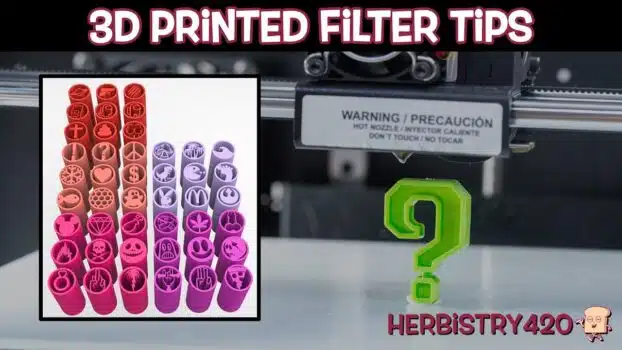


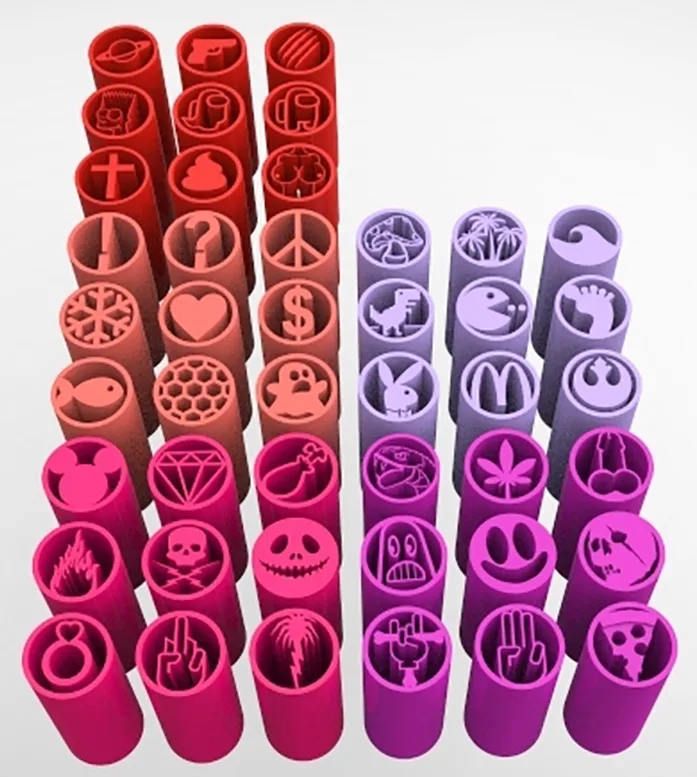
3D printed cannabis filter tips are reusable joint filters you can print at home on any desktop printer. Made in novelty shapes like diamonds, weed leaves, and Playboy bunnies, they are more of a curiosity than a daily essential — but there are 5 genuine scenarios where they make sense. Here is an honest breakdown after testing them in both hand-rolled and machine-rolled joints.
How 3D Printed Cannabis Filter Tips Work
You print these filters at home on either an FDM printer (fused deposition modelling, the common desktop kind) or a resin printer. An FDM printer filter tip is the most accessible option since these machines are cheap and widely available. Download or design a shape that fits your rolling paper width, print it, and slot it into the end of your joint exactly like a cardboard filter. The result is a rigid, reusable cannabis filter you can wash and use again — and in any shape you can imagine.
Are 3D Printed Cannabis Filter Tips Safe?
This is the main concern. FDM printers use PLA or PETG plastic — neither is certified for inhalation. One practical workaround: spray the finished tip with high-temperature varnish after printing. This seals the surface so the plastic is less likely to off-gas if the joint warms it slightly. Whether that is enough is a personal judgement call. It is not a medically verified solution, but it is what many people do before using a reusable cannabis filter of any kind.
5 Best Uses for 3D Printed Cannabis Filter Tips
- Build a 3D weed filter tip stash across multiple locations — The single best practical use for these filters is distributing them everywhere you might want to roll. Leave one in your desk, nightstand, car, go-bag, or a friend’s place. A 3D weed filter tip stash means you are never ripping business cards for roaches again. Print a small batch and scatter them wherever you normally smoke.
- Hand-rolled joints only — skip the rolling machine — Testing revealed a key issue with machine-rolled joints. The machine wraps the paper tighter than the filter’s fixed diameter, leaving an air gap at the filter end. This gap ruins the draw. For a 3D printed joint filter to work properly, roll by hand and make sure the joint is at least as thick as the filter opening. When the fit is right, it hits cleanly with no issues.
- Novelty gifts for cannabis enthusiasts — A set of custom-shaped filters in someone’s favourite design — diamond, weed leaf, or custom logo — makes a genuinely fun small gift for a cannabis-using friend with a 3D printer. The novelty wears off for daily use but as a conversation piece these are impressive.
- Zero-cost alternative to paper filters — A box of paper tip booklets from Amazon costs almost nothing and lasts years. But if you already own a 3D printer, making an FDM printer filter tip costs only grams of filament per unit — essentially free. No running out, no trips to the store, no improvising. For anyone who already has a printer, making a reusable cannabis filter backup stock is an obvious win.
- Custom sizing for non-standard joint diameters — Commercial filters come in standard sizes. If you consistently roll fat joints or thin pinners, designing a custom-diameter 3D printed joint filter solves the fit problem entirely. This is the most genuinely useful application for regular joint smokers.
Frequently Asked Questions
Are 3D printed cannabis filter tips better than paper?
Not outright better — different. They are rigid and reusable versus disposable and cheap. The practical advantage is having a reliable reusable cannabis filter stashed everywhere without needing to keep paper filters in stock.
What printer do I need?
Any consumer FDM printer works for a basic filter tip. Look up “joint filter tip” on Thingiverse or Printables for free designs. Use PLA or PETG filament and seal the finished piece with high-temperature varnish before use.
Where do I find designs for 3D printed cannabis filter tips?
Search Thingiverse or Printables for “cannabis filter tip” or “joint filter.” You will find dozens of options from simple cylinders to weed leaf shapes, all free. Tinkercad is good for designing a custom size or adding a logo to the end of the filter.
References
Learn More on Herbistry420
Purchase Links
☕ Support Herbistry420 on Buy Me a Coffee
Note: Some of the provided links are affiliate links. If you make a purchase through these links, I may earn a small commission at no additional cost to you. This helps support the channel and allows me to continue making videos for free. Thank you for your support!
Add comment