

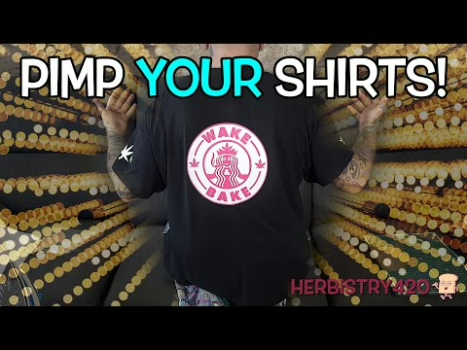


Wondering if you can use heat transfer vinyl no machine required? The answer is yes — and it’s way easier than you think! In this guide, I’ll show you how to pimp out your shirts, jackets, and sweatshirts with HTV using just scissors and a regular household iron. No Cricut, no Silhouette, no heat press needed.
What Is Heat Transfer Vinyl (HTV)?
Heat transfer vinyl is a special vinyl material that bonds to fabric when heat is applied. It comes in rolls or tubes — typically about 25 cm x 1 meter — and costs around $5–7 CAD per roll. The vinyl has two sides: a shiny clear backing (carrier sheet) and the actual vinyl color underneath. You draw and cut on the shiny side, then iron the vinyl side face-down onto your garment.
5 Tips for Using Heat Transfer Vinyl No Machine
Whether you’re going full DIY or just experimenting for the first time, these heat transfer vinyl no machine tips will save you from the common mistakes.
Tip 1: Draw Your Design on the Shiny Side
Use a Sharpie marker to draw your design directly on the shiny (carrier) side of the HTV. The Sharpie marks won’t transfer to your shirt because the carrier sheet is removed after pressing. Simple shapes like leaves, geometric designs, or letters work best when cutting by hand. Remember to mirror (flip) any text or asymmetric designs — this is the most common mistake beginners make with iron on vinyl clothes DIY projects.
Tip 2: Cut Carefully with Scissors or an X-Acto Blade
Sharp scissors or an X-Acto blade are your best friends for HTV without heat press or cutting machine. The key is making sure your cuts meet exactly at corners — if you overshoot a cut, that line will show up in the final transfer. Take your time and cut slowly around curves. You can also print a template on paper, tape it to the HTV, and cut through both layers.
Tip 3: Use Parchment Paper When Ironing
Never iron directly on the HTV! Always place a sheet of parchment paper between the iron and your design. This protects both the design and the iron from damage. Set your iron to a high heat setting (8 or 9 out of 10 steps) — you want it hot but not at max. Press firmly for about 10–15 seconds, moving the iron slowly across the design.
Tip 4: Use Cardboard Inside the Garment
Place a piece of cardboard inside the shirt to separate the front from the back. This prevents the heat transfer vinyl iron from accidentally pressing through to the back of the shirt. An art board or thick cardboard works perfectly. Don’t use plastic boards — the iron’s heat can warp them and transfer residue to your garment.
Tip 5: Peel the Backing While Warm
After pressing, you need to peel the carrier sheet away from the vinyl. The timing here is everything — peel while it’s still warm but not scorching hot. If the vinyl starts lifting with the carrier, press it back down and iron for a few more seconds. Peel slowly from multiple corners rather than pulling from one side, which can stretch or distort the design.
DIY Shirt Customization Vinyl: Step-by-Step Process
Ready for a complete DIY shirt customization vinyl project? Here’s the full process from start to finish:
- Choose your design — Keep it simple for hand-cutting. Leaves, stars, basic shapes, and block letters work great.
- Draw on the shiny side — Use a Sharpie and remember to mirror any text.
- Cut out your design — Use scissors or an X-Acto blade. Cut only the vinyl, not the backing.
- Position on your garment — Lay the vinyl face-down (shiny side up) on the fabric. Line it up using seams as reference points.
- Cover with parchment paper — Place parchment paper over the design before ironing.
- Iron with firm pressure — Press for 10–15 seconds per section. Move in small circular motions.
- Peel the carrier sheet — Wait until warm (not hot). Peel slowly from corners.
- Final press without cover — Do one more 10-second press directly on the vinyl (no parchment) to fully lock it in.
Can You Layer Heat Transfer Vinyl?
Yes! You can layer heat transfer vinyl no machine cuts up to 4 times. However, there are some important rules:
- Always put glitter or textured vinyl as the TOP layer — never add regular HTV on top of glitter vinyl
- Press each layer completely before adding the next
- Different HTV colors may have slightly different adhesion properties — white and black tend to be more durable than some fluorescent colors
- When layering, do lighter presses for the first layers and a final firm press at the end
Heat Transfer Vinyl Tutorial: Common Mistakes to Avoid
This heat transfer vinyl tutorial wouldn’t be complete without covering what can go wrong. Here are the top mistakes and how to fix them:
- Forgetting to mirror the design — Always flip text and asymmetric designs before cutting
- Ironing on the wrong side — The shiny/clear side faces UP when ironing. The colored vinyl touches the fabric
- Too short or too long press time — Under-ironing means the HTV won’t stick; over-ironing makes the carrier hard to remove
- Peeling too fast or cold — Peel while warm for best results
- No parchment paper — Always use parchment paper to protect the design and iron
- Cuts that overshoot corners — Visible extra cut lines will appear in the finished design
FAQ: Heat Transfer Vinyl No Machine
Can I use regular vinyl instead of heat transfer vinyl?
No — regular craft vinyl (like the kind used for signs or mugs) is not designed for fabric and won’t bond properly with heat. You specifically need heat transfer vinyl (HTV) for clothing projects.
What iron temperature is best for HTV?
Most HTV works best at a high cotton/linen setting — around 300–320°F (150–160°C). Without a heat press, you’ll want your iron set to high (step 8 or 9 out of 10). Always test on a scrap piece first.
How do I wash clothes with heat transfer vinyl?
Turn the garment inside out before washing. Use cold or warm water — avoid hot water and high-heat drying, which can cause HTV to peel or crack over time. Most quality HTV is machine washable when properly applied.
Does HTV work on all fabrics?
HTV works best on cotton, polyester, and cotton-poly blends. It won’t stick well to nylon, leather, or fabrics with special coatings. For 100% polyester, use a lower iron temperature to avoid scorching.
How long does heat transfer vinyl last?
When properly applied and cared for, quality HTV can last 50+ washes. The key factors are correct application temperature, complete adhesion during pressing, and gentle washing care.
References
Learn More on Herbistry420
Check out more creative DIY and art project videos on Herbistry420:
- Art Projects — creative DIY tutorials and hands-on crafts
- Misc Videos — fun experiments and random creative content
Purchase Links
🛒 Heat Transfer Vinyl Fluorescent – https://amzn.to/42VQhC4
🛒 Brother Scan n Cut (not the one I used in the video as it is not available anymore) – https://amzn.to/3ER9gDy
Support Herbistry420 by visiting our Cannabis Apparel Store, we have t-shirts, hoodies, pants, towels, you name it!
Note: Some links are affiliate links. Purchases through these links support the channel at no extra cost to you.
Add comment