






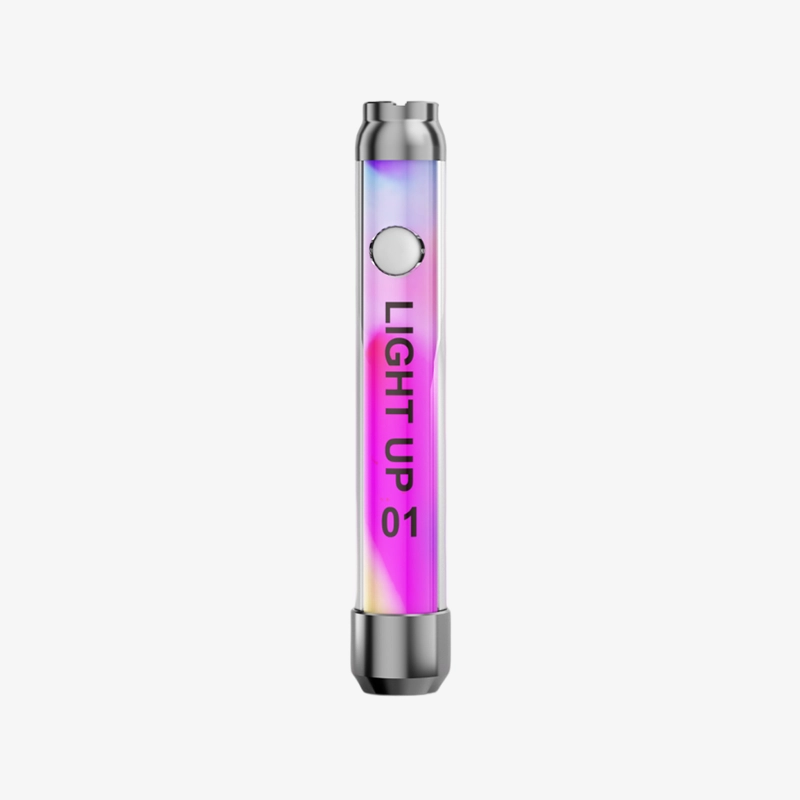
In this HeyBar 510 battery review, Fordee from Herbistry420 puts this colorful LED vape battery through its paces after a month and a half of daily use. Spoiler: at just $15, the HeyBar 510 vape battery is an impressive bang-for-buck pick for anyone running 510 carts.
HeyBar 510 Battery Review — What Is the HeyBar?
The HeyBar is a 510 thread vape battery that works with standard 510 cartridges as well as other concentrate adapters. It features a single-button design, a USB-C charging port on the bottom, an acrylic or plastic outer sheath, and an LED light that changes color based on your current temperature setting. It comes in 12 different color options.
The HeyBar 510 vape battery has a 500mAh capacity — enough for extended daily use between charges. The 510 thread (10 threads spaced 5mm apart) is the industry standard, meaning it works with the vast majority of pre-filled or DIY 510 carts on the market.
510 Cart Battery Temperature Settings Explained
One of the standout features in this HeyBar 510 battery review is the five-setting voltage system. The 510 cart battery temperature settings use LED color coding so you always know where you are:
- Blue — 2.8V (lowest): Best for flavor, smooth hits, works great with thinner e-juice carts
- Green — 3.2V: Slightly warmer, good all-around setting
- Yellow — 3.4V: Middle ground between flavor and cloud
- Purple — 3.6V: More vapor production, less flavor
- Red — 3.8V (highest): Biggest clouds, most heat, least flavor
To cycle through the 510 cart battery temperature settings, press the button three times. Fordee recommends staying on the lower settings (blue or green) for the most flavor. Higher settings produce bigger clouds but at the cost of taste. If your cart has thicker oil, bump the heat up slightly to improve airflow.
Vape Battery Preheat Cycle — How It Works
The HeyBar includes a vape battery preheat cycle that gently warms the cart before your draw. To activate it, press the button twice. The LED will cycle through the colors while it preheats. To stop the vape battery preheat cycle early, press the button once. This feature is especially useful with thicker oils or in colder weather.
For a normal draw, hold the button down. The LED lights up while you inhale. When it blinks, the draw cycle is complete. Turn the battery on and off by pressing the button five times — a universal safety lock to prevent accidental activation in your pocket.
Is the HeyBar 510 the Best 510 Battery for Vape Carts?
After a month and a half of daily use, Fordee calls the HeyBar the best 510 battery for vape carts at this price point. Here’s why:
- 5 temperature settings — More control than a typical fixed-voltage 510 pen
- USB-C charging — Modern, reversible, no more fumbling with micro-USB cables
- Preheat cycle — Handles thick oils without burning
- LED color coding — Always know your voltage at a glance
- $15 price tag — Easy to recommend, easy to replace if lost
The only caveat: the LED light makes it less discreet in dark environments. If you need to be inconspicuous, cup your hand over the battery. The HeyBar 510 vape battery is not the most stealthy device, but it is reliable, affordable, and fun to use.
Frequently Asked Questions
How do I turn on the HeyBar 510 battery?
Press the button five times quickly to turn the HeyBar 510 battery on or off. The LED will flash to confirm. This safety lock prevents accidental activation in your pocket or bag.
What temperature should I vape my 510 cart at?
For the best flavor from your 510 cart, start at the lowest setting (blue — 2.8V on the HeyBar). If your oil is thick or airflow is restricted, step up to green or yellow. Higher settings (purple/red) produce more vapor but less flavor and consume oil faster.
How do I use the preheat on the HeyBar?
Press the button twice to start the preheat cycle. The LED will cycle through colors while preheating. Press the button once to stop it early. This is helpful for thicker oils or cold conditions.
References
Learn More on Herbistry420
Purchase Links
Get 10% Off Your Purchase at HeyBarDevices.com using coupon code Herbistry420 –
🛒 https://bit.ly/3uC6w8j – https://bit.ly/3uC6w8j
Support Herbistry420 by visiting our Cannabis Apparel Store, we have t-shirts, hoodies, pants, towels, you name it!
Note: Some links are affiliate links. Purchases through these links support the channel at no extra cost to you.
Add comment