

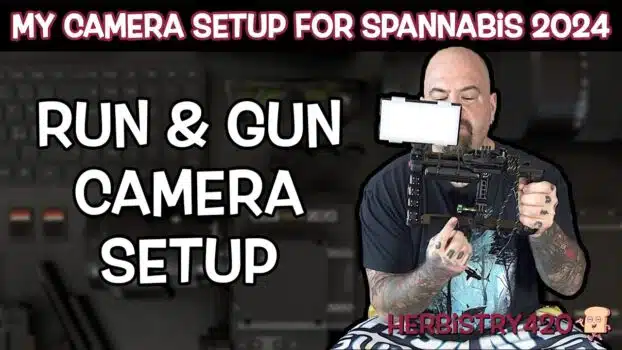

Heading out to Spannabis 2024 meant my camera setup for events had to be lightweight, durable, and powerful enough to handle a full day of interviews and booth walkthroughs without stopping. I put together a compact run and gun camera setup that delivered on all fronts, and a lot of people at the expo asked about the rig — so this guide breaks down every component. Whether you are covering a cannabis expo or any fast-paced event, these 5 gear picks form the foundation of a great camera setup for events.
Why Your Camera Setup for Events Matters
Event filming is unpredictable. You are moving between booths, conducting on-the-spot interviews, managing changing light conditions, and staying light enough on your feet to cover the whole venue. A properly assembled camera setup for events solves every one of those challenges — delivering stability, extended battery life, clean audio capture, and a usable monitor all in one package. The right run and gun camera rig keeps things manageable without weighing you down, so you can shoot for hours without fatigue or missed moments.
1. Build a Run and Gun Camera Rig With the Right Cage
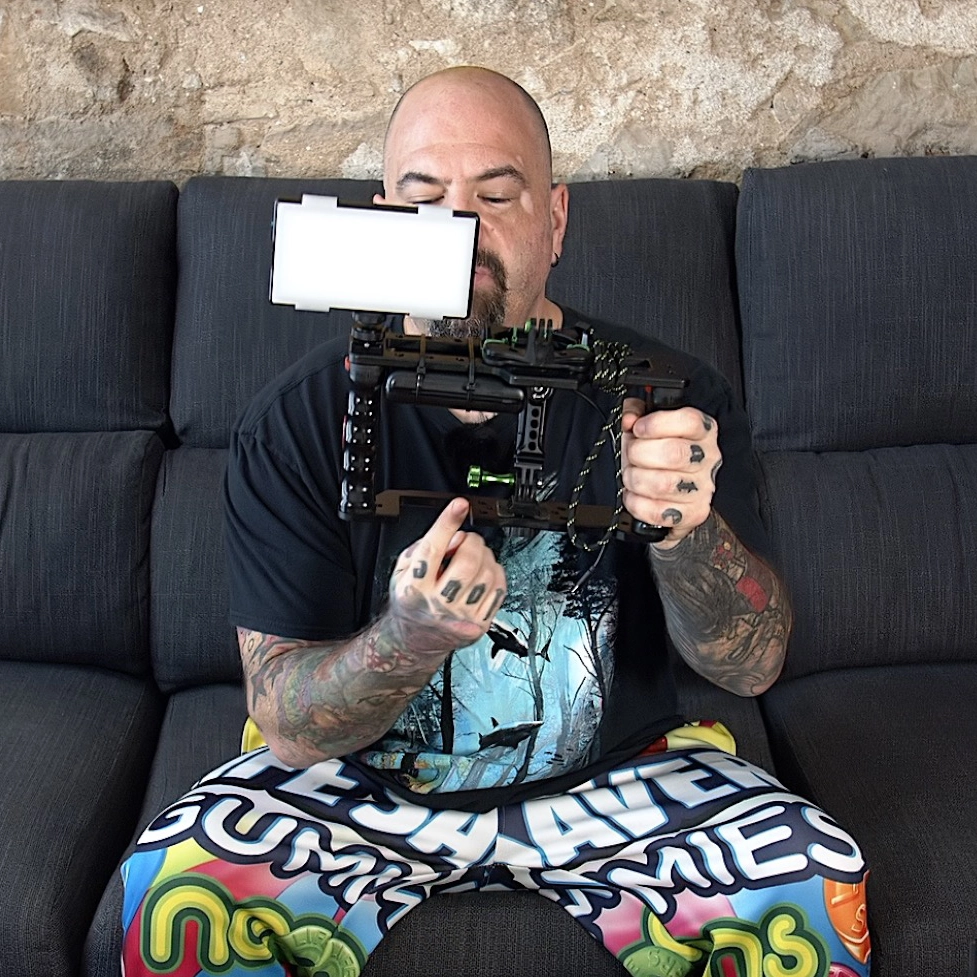
Every run and gun camera rig starts with the cage. The one used at Spannabis had quarter-20 and three-eighth-inch threads, multiple cold shoes, and enough mounting real estate to hold every accessory simultaneously — power bank, phone mount, and light all attached at once. Look for a cage that gives you that kind of flexibility. Bring extra thumb screws too, because being able to swap accessories in seconds without missing a shot is what separates a prepared setup from a frustrating one.
2. GoPro Event Filming Setup: Media Mod and HyperSmooth
The GoPro with the Media Mod is the engine of this GoPro event filming setup. The Media Mod adds an HDMI output, a 3.5mm audio input, and two cold shoes for mounting a wireless receiver and other accessories. HyperSmooth stabilization built into the GoPro gives you smooth, professional-looking footage even when you are walking quickly through a packed expo hall. The only weakness is battery life — roughly 20 to 30 minutes of continuous recording solo — but the power bank in the next step eliminates that issue entirely.
3. Power Bank for All-Day Shooting
A 20,000 mAh power bank zip-tied to the cage transforms your camera setup for events into an all-day machine. Run a USB to USB-C cable from the bank into the Media Mod and your camera stays powered through the entire event without interruption. At Spannabis 2024, I shot a full day and barely made a dent in the charge. If your zip ties are too short, thread one through the end of another to make a longer strap — a simple trick that saves a lot of frustration in the field. Always pack extras along with a small wire cutter for quick adjustments.
4. Wireless Audio for Events: Hollyland Lark Max
Reliable wireless audio for events is non-negotiable when you are recording interviews in a noisy expo hall. The Hollyland Lark Max comes with two transmitters and one receiver, making it perfect for capturing both sides of a conversation. Each transmitter has a magnetic clip on the back — slide it under a shirt and the magnetic disc on the outside holds it securely in place. The receiver clips into the Media Mod cold shoe and connects via 3.5mm jack. The charging case keeps every component topped up between uses, and the whole system packs away in seconds. For any wireless audio for events situation, this kit is one of the easiest and most reliable options available.
5. External Monitor via Your Phone
The GoPro’s built-in screen is small enough that framing shots at a fast-moving event can be genuinely difficult. The solution is to route the HDMI output through a micro-HDMI to USB-C adapter chain into your smartphone, then use an app like NextCamera to turn it into a full external monitor. A SnapMount phone holder mounts the phone to the back of the cage with both forward-backward and side-to-side tilt adjustment for easy positioning. This step is optional — you can absolutely work with the small built-in screen if you trust your framing — but having that bigger display makes a real difference when you are moving quickly through a crowded venue.
Bonus: Portable LED Video Light
A compact LumeCube Panel Pro mounted to the cage provides fill light for darker corners of the venue. It offers adjustable color temperature and brightness levels, so you can dial it in for any lighting situation. At Spannabis the venue lighting was excellent so the panel stayed in the bag, but having it available meant full coverage for any low-light scenario. It attaches and detaches quickly via a thumb screw, so it adds minimal weight and maximum flexibility to the rig.
Tips for Your Run and Gun Camera Setup
Before any event, run a full test of your run and gun camera setup at home. Record test footage in different lighting, check audio levels with the transmitters clipped under clothing, and get comfortable holding the cage with your arms tucked close to your sides — that body position adds natural stabilization on top of HyperSmooth. Also rehearse your GoPro event filming setup in low-light conditions so you know exactly how to adjust on the fly. Pack backup cables, extra zip ties, spare thumb screws, and your wire cutter. A camera setup for events that feels like second nature before you arrive is one that delivers on the day.
Frequently Asked Questions
How do I get great wireless audio for events?
Use a dual-transmitter wireless kit like the Hollyland Lark Max. Clip one transmitter on yourself and one on your subject, connect the receiver to your camera via 3.5mm jack, and you get clean audio from both voices even in a loud venue. It is the most practical approach for a run and gun camera rig where wired mics are not practical.
How do I extend my GoPro event filming setup battery life?
Strap a high-capacity power bank to the cage and connect it to the GoPro Media Mod via USB-C. This upgrades a 20-minute GoPro into an all-day shooter. It is the single most impactful change you can make to your run and gun camera setup for extended event coverage.
Do I need an external monitor for event filming?
It is optional but genuinely useful. Routing your GoPro HDMI output to a phone mounted on the cage via a SnapMount gives you a much larger screen for framing shots accurately while moving. If you are comfortable with the small built-in screen, skip it — but most people find the bigger display worth adding.
References
Learn More on Herbistry420
Purchase Links
🛒 GoPro (I used v9 but the current version of GoPro is v12) – https://amzn.to/3IRKySw
🛒 GoPro Media Mod – https://amzn.to/43yPR2z
🛒 20,000mAh Power Bank – https://amzn.to/3TQu3vd
🛒 Camera Cage with Top Handle (they don’t have the one I used in the video, but this would work the same) – https://amzn.to/3vtiwtp
🛒 Holyland Lark Max Wireless Audio Kit – https://amzn.to/3TPlUbv
🛒 LumeCube Panel Pro Portable Video Light – https://amzn.to/3vfMjWB
🛒 SnapMount Magnetic Mount for GoPro – https://amzn.to/3vrCl4m
🛒 SnapMount Mobile Phone Holder – https://amzn.to/3VvN2gI
🛒 SnapMount Ultra Kit (has both the Mount / Phone Holder and more) – https://amzn.to/3VxgIu3
🛒 HDMI to USB (includes the usb to usb-c adaptor) – https://amzn.to/3TQ5aAM
Support Herbistry420 by visiting our Cannabis Apparel Store, we have t-shirts, hoodies, pants, towels, you name it!
Note: Some links are affiliate links. Purchases through these links support the channel at no extra cost to you.
Add comment