





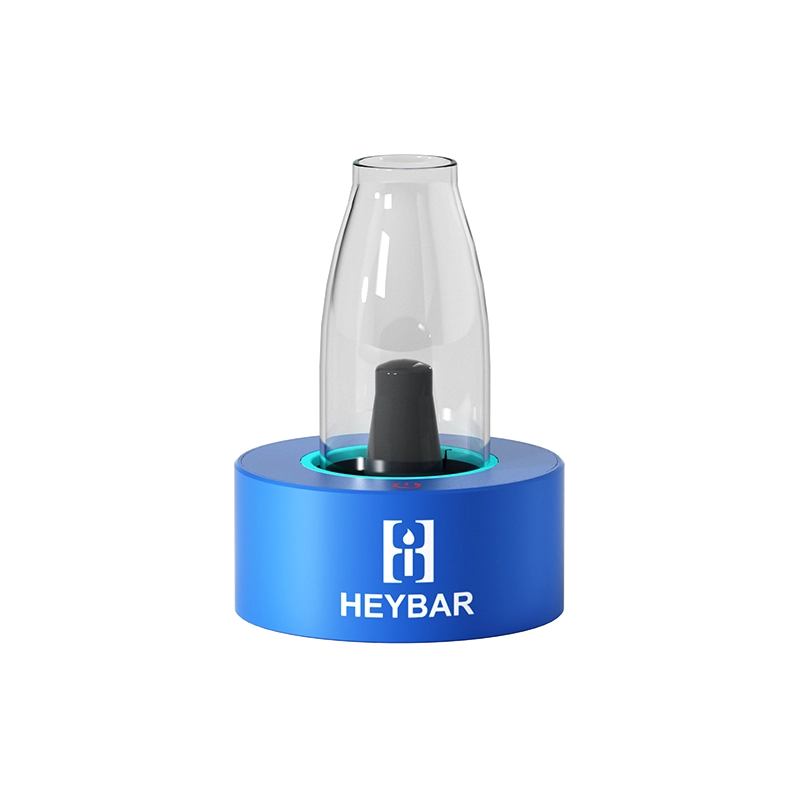
This OLA Desktop Vape Review covers one of the most versatile and underrated desktop vaporizers in the HeyBar lineup. The OLA is a desktop dab rig that supports quartz and ceramic atomizers, 510 cartridges, and an optional water filter attachment that transforms every hit into something noticeably smoother and cooler. If you use concentrates at home, this device deserves serious attention.
What Is the OLA Desktop Vape?
The OLA is a desktop vaporizer from HeyBar Devices designed for concentrate enthusiasts who want a stationary, high-performance dab setup. What sets it apart from competing desktop rigs is its flexibility: you can run the OLA desktop vape water filter attachment for bong-style filtration, swap between a quartz or ceramic atomizer depending on your preference, or even drop in a 510 cart for a completely different style of session. One device covers a wide range of consumption methods.
OLA Desktop Vape Review: 5 Powerful Reasons to Buy
1. Water Filter Attachment Makes Every Hit Noticeably Smoother
The standout upgrade for the OLA is its desktop vape water attachment. The filter adds a water-cooled filtration stage above the heating element, delivering hits that are markedly softer and cleaner than dry rips. If you buy the OLA and skip the water filter, you are genuinely shortchanging yourself. Fill the water chamber with about one inch of water — no more, or you risk pulling water into the device on your first draw. The OLA desktop vape water filter is an essential accessory, not an optional extra.
2. Switch Between Quartz or Ceramic Atomizer
The OLA vaporizer quartz ceramic atomizer compatibility gives you genuine control over your sessions. Quartz heats faster and delivers a more immediate flavour hit. Ceramic retains heat more evenly and tends to produce a smoother, more consistent draw. Being able to swap between the two without tools or adapters means you can tailor the device to the concentrate you are running and the style of hit you want on any given day.
3. Accepts 510 Cartridges Too
Beyond concentrates, the OLA desktop vape 510 cart compatibility makes it genuinely versatile. If you regularly use pre-filled or self-made 510 cartridges, you can drop one directly into the OLA and run it through the same water filter for a filtered cart experience that most portable setups can not offer. Switching between cartridge mode and concentrate mode takes seconds and expands the range of what you can run through the device significantly.
4. Exceptional Battery Life and USB-C Charging
The OLA’s battery performance stands out among desktop vaporizers. In testing, the device went over two weeks of regular daily use before needing a charge. The USB-C port on the back makes charging straightforward when needed. The OLA also features an auto shut-off that activates after a period of inactivity, which is a big part of why the battery lasts so long even with frequent sessions.
5. Simple Controls with Multiple Power Modes
Operating the OLA is simple: press the button twice to initiate a heat cycle. The power mode is displayed by LED colour — red is the highest power setting. There is also a carb cap on the side of the device that you can press at the end of a hit to allow fresh air in and clear the chamber, though the OLA hits cleanly even without using it. For a desktop vape, the simplicity of the controls is a genuine feature rather than a compromise.
Is the OLA Desktop Vape Worth It?
The OLA Desktop Vape is one of the better value desktop rigs available today. The quartz and ceramic atomizer flexibility, 510 cart support, and the transformative water filter attachment make it a multi-purpose device that earns a permanent spot in any home setup. If you are new to desktop vaporizers or upgrading from a basic wax pen, the OLA is an excellent starting point.
Frequently Asked Questions
How much water should I put in the OLA water filter?
Fill the OLA desktop vape water filter chamber with approximately one inch of water. Do not overfill or you may pull water through the mouthpiece on your first draw. After filling, attach the water filter section securely and make sure the connections are tight before pressing the button to start a heat cycle.
Can I use the OLA without the water filter?
Yes, the OLA functions as a standard desktop rig without the water filter. The hits will be warmer and slightly harsher than with the filter attached, but perfectly usable. That said, the water filter dramatically improves the experience and is strongly recommended for daily use.
What concentrates work with the OLA Desktop Vape?
The OLA works with rosin, wax, shatter, budder, live resin, and other common concentrates loaded into the quartz or ceramic oven. For pre-filled or homemade 510 carts, swap to the 510 cart adapter. Do not overfill the oven — a small amount of concentrate goes a long way with the direct heat element.
How do I know the OLA is on?
Press the button once to check the current power mode — the LED will light up to the active colour setting. If the device has auto-shut-off, press it once to wake it up. Press twice to begin a heat cycle. Red indicates the highest power mode; lighter colours are lower temperature settings.
References
Learn More on Herbistry420
Purchase Links
🛒 To purchase the OLA Desktop Vaporizer and/or the Water Filter or any of the vaporisers over at – http://www.HeyBarDevices.com/
, use the coupon code herbistry420 to receive 10% off your order.
Support Herbistry420 by visiting our Cannabis Apparel Store, we have t-shirts, hoodies, pants, towels, you name it!
Note: Some links are affiliate links. Purchases through these links support the channel at no extra cost to you.
Add comment