




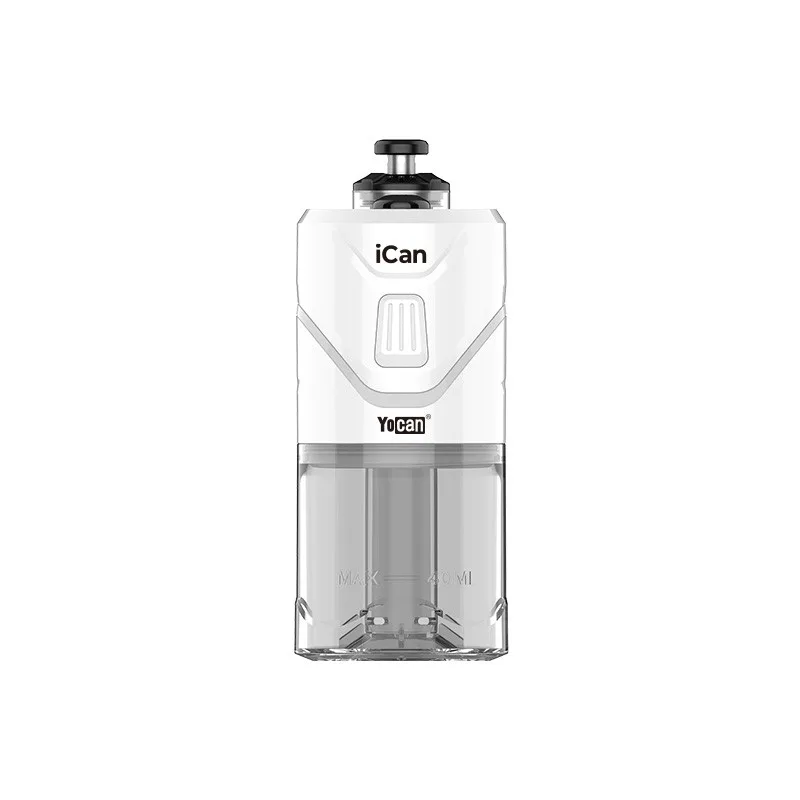
Welcome to this YoCan iCan review. The iCan is a soda-can-style entry-level e-rig from YoCan that retails for $60 — or just $54 with a 10% discount code. It packs a standout feature list: swivel mouthpiece, magnetic carb cap with swirling airflow, haptic feedback, and a simplified 2 power setting system that makes hitting concentrates dead easy. Here’s everything you need to know.
YoCan iCan Review: What Is the iCan?
The YoCan iCan is a compact, portable e-rig shaped like a soda pop can. It’s designed for cannabis concentrates — rosin, live resin, wax, shatter — and is aimed squarely at entry-level users who want quality hits without a premium price tag.
The iCan comes in 6 colours: white, seafoam green, muted purple, lime green, peach, and black. The full-colour packaging matches the device colour, and a hologram sticker confirms product authenticity. In the box you get the iCan, a manual, branded cotton swabs, a USB-C charging cable, and a Yocan collectible animal card (collect all 13 for prizes).
2 Power Settings That Actually Make Sense
One of the most interesting design decisions in this YoCan iCan review is the simplified 2 power settings:
- Green (Low Power) — optimized for flavor, ideal for terpene-rich concentrates where you want to taste every nuance
- Red (High Power) — maximizes vapor production, great for stubborn concentrates with fats and lipids, or when you want big clouds
Switch between them by pressing the main button 3 times. While many e-rigs offer 4–5 settings, the iCan’s 2-setting approach is surprisingly smart — in practice, most users only ever toggle between low and high anyway. It keeps the experience simple without sacrificing versatility.
Session Mode and On-Demand Mode
The YoCan iCan supports two heating modes for different session styles:
- Session Mode: Double-press the main button. The iCan preheats for about 8 seconds (it vibrates when ready), then holds temperature for approximately 35 seconds. Hold the main button while hitting; releasing injects fresh air through the magnetic carb cap for a cleaner pull.
- On-Demand Mode: Hold the main button down. The device heats as you hold, cools when you release — great for micro-dosing or controlling your draw precisely.
Power on or off with 5 rapid button presses. The small button on the back activates a light inside the atomizer — a fun aesthetic touch for low-light sessions.
Magnetic Carb Cap and Swirling Airflow
The YoCan iCan’s magnetic carb cap is a genuine standout feature. It snaps onto the atomizer magnetically (no screwing on and off), and its push-down mechanism injects fresh air into the air path mid-hit — replicating the carbing action you’d use with a traditional bong or pipe.
Combined with the iCan’s proprietary swirling airflow system, pressing the carb cap while hitting creates a cyclone effect inside the chamber. The result? Monstrous hits that feel far bigger than a $60 device has any right to produce. Flavor on the green setting is excellent; cloud production on red is genuinely impressive.
Is the YoCan iCan Worth $60?
For the most part, yes — with one caveat. Here’s the YoCan iCan review verdict:
- ✓ Hard-hitting performance for a $60 budget e-rig
- ✓ Magnetic carb cap with swirling airflow — unique at this price
- ✓ Swivel mouthpiece — ergonomic and easy to use
- ✓ Haptic feedback (vibration alerts) — premium feel
- ✓ Impact-resistant injection-moulded plastic — durable
- ✓ Simplified 2 power settings — easy to master
- ⚠ Overheating: after 3–4 back-to-back sessions, the iCan needs a 10–15 minute cooldown before it’ll heat again
The overheating limitation matters if you’re passing the iCan around a large group, but for solo sessions or smaller circles it’s rarely an issue. At $54 with the 10% coupon, the YoCan iCan is excellent value and one of the better entry-level e-rigs available right now.
Frequently Asked Questions
How do I turn on the YoCan iCan?
Press the main button 5 times rapidly within 2 seconds to power the YoCan iCan on or off. The LED strip will activate to confirm the device is on.
How many power settings does the YoCan iCan have?
The YoCan iCan has 2 power settings: Green (low power, best for flavor) and Red (high power, best for big clouds). Toggle between them by pressing the main button 3 times.
What is the YoCan iCan session time?
In session mode (double-click), the YoCan iCan preheats for about 8 seconds and stays at temperature for approximately 35 seconds. In on-demand mode, it heats only while you hold the button.
Does the YoCan iCan overheat?
Yes — after 3 to 4 back-to-back sessions, the YoCan iCan enters an overheat protection mode and requires 10–15 minutes of rest before it will heat again. This is a safety feature to protect the device and the user.
References
Learn More on Herbistry420
Purchase Links
Save 10% on the YoCan iCan with my link:
🛒 YoCan iCan — Budget E-Rig (10% Off)
Note: Some links are affiliate links. Purchases through these links support the channel at no extra cost to you.
Add comment